
Printer identity
Record brand, complete model, revision, and serial range.
When you visit our website, it may store or retrieve information on your browser, mostly in the form of cookies. This information might be about you, your preferences or your device and is mostly used to make the site work as you expect it to. You can choose not to allow some types of cookies. Read our Privacy Policy
These cookies are necessary for the website to function and cannot be switched off in our systems.
These cookies allow us to collect information about website traffic and technical performance.
These cookies enable enhanced functionality and personalisation.
These cookies may be set through our site by our advertising partners to build a profile of your interests.
Printhead field guide / DX5
A DX5 label does not tell you whether a replacement will fit. Verify the printer, head code, ink system, and control electronics together before ordering.
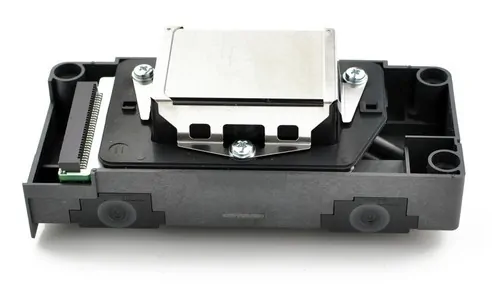
The name DX5 covers listings that may differ in coding, lock status, and intended ink. Get written confirmation for your exact machine configuration before paying.
Record brand, complete model, revision, and serial range.
Photograph the installed label, part code, and connector face.
Check board, firmware, decoder, and coding or unlock requirements.
Confirm ink chemistry, install procedure, calibration, and warranty.
Compatibility rule: a seller saying “DX5 compatible” is not enough. A DigiPrint listing excludes specific Mutoh and Mimaki models, while other marketplace listings make broader claims. Verify against the printer maker or an experienced service provider.
These figures come from DigiPrint Supplies’ product page. They are supplier specifications, not a guarantee for every DX5 variant.
| Specification | DigiPrint listing |
|---|---|
| Technology | Micro Piezo |
| Resolution | 1,440 dpi |
| Nozzle layout | 1,440 nozzles, 8 rows × 180 |
| Firing frequency | 8 kHz |
| Drop volume | 1.5 to 21 pL |
Supplier pages disagree on some figures and compatible models. See the supplier product listing.
A comparison article can help frame questions, but it cannot certify a replacement for your printer. The right choice is the model documented for your exact setup.
Usually the lower risk path when the printer maker still supports that head and the system is in serviceable condition.
Only after the printer maker or qualified technician confirms board, firmware, coding, ink, cabling, and calibration support.
Do not treat DX7 as a drop in upgrade. Ask for confirmation tied to your full printer model and control board, not just a general DX5 versus DX7 comparison.
For general background, see Johope’s DX5 and DX7 overview. Use it to prepare questions, then verify with the printer service documentation.
Marketplace pages from Lazada, Amazon, AliExpress, eBay, and IndiaMART show availability and seller descriptions. Search placement and product wording do not prove genuineness or fit.
Can you confirm compatibility with my full printer model and board revision in writing?
Can you send current photos of the actual head label, connectors, and sealed packaging?
Is the part original, coded, or unlocked, and what evidence supports that description?
Which ink system is it specified for, and what installation or calibration is required?
What exactly does the warranty cover, and can the item be returned if the code is wrong?
Ink delivery, dampers, cap top, cables, board faults, and settings can all affect a nozzle check. Diagnose the ink path and electrical system before buying a costly replacement.
Share a current nozzle check and the installed head label with a qualified technician. Follow the printer maker’s maintenance procedure for your ink system.
No. Confirm the exact head variant and supported ink for your printer. The DX5 name alone does not establish ink compatibility.
Only if the printer maker confirms support for your exact model, board, firmware, ink, and installation process.
Do not assume so. Suppliers cross reference several codes, but the printer documentation or service provider should confirm the correct one.
Not before diagnosis. Check the approved maintenance procedure and ink delivery system, then have the printer assessed.
Send the printer model, installed head part number, ink type, and a clear photo of the label so the team can direct your enquiry.